airbag TESLA MODEL S 2018 Owner's Manual
[x] Cancel search | Manufacturer: TESLA, Model Year: 2018, Model line: MODEL S, Model: TESLA MODEL S 2018Pages: 195, PDF Size: 5.51 MB
Page 2 of 195

Overview............................................................. 2
Interior Overview.........................................................................2
Exterior Overview....................................................................... 3
Opening and Closing..................................... 4 Doors............................................................................................... 4Windows.........................................................................................9Rear Trunk.................................................................................... 10 Front Trunk...................................................................................13Glove Box......................................................................................15Sunroof.......................................................................................... 16Cup Holders................................................................................. 17
Seating and Safety Restraints................... 18 Front and Rear Seats............................................................... 18Seat Belts...................................................................................... 21 Child Safety Seats.................................................................... 24
Tesla Built-In Rear Facing Child Seats............................... 31 Airbags......................................................................................... 35
Driving...............................................................39 Driver
Profiles............................................................................ 39
Steering Wheel........................................................................... 41 Mirrors.......................................................................................... 44Starting and Powering
Off.................................................... 45
Gears............................................................................................. 46 Instrument Panel.......................................................................47 Lights.............................................................................................53Wipers and Washers............................................................... 58Brakes........................................................................................... 60Traction Control........................................................................ 63Park Assist.................................................................................. 64 Vehicle Hold............................................................................... 66Acceleration Modes................................................................. 67
Trip Information........................................................................ 69Getting Maximum Range...................................................... 70Rear View Camera.................................................................... 72
Driver Assistance.......................................... 73
About Driver Assistance........................................................ 73
Traffic-Aware Cruise Control............................................... 76
Autosteer..................................................................................... 82 Auto Lane Change................................................................... 85
Autopark...................................................................................... 87 Lane Assist................................................................................... 91Collision Avoidance Assist.................................................... 93Speed Assist............................................................................... 97
Using the Touchscreen............................... 99 Touchscreen Overview........................................................... 99
Controls...................................................................................... 104 Settings.......................................................................................107Climate Controls........................................................................ 111Smart Air Suspension............................................................. 117
Media and Audio...................................................................... 119 Phone...........................................................................................124 Maps and Navigation............................................................. 126Calendar.......................................................................................131Security Settings..................................................................... 132 HomeLink
Page 19 of 195

Correct Driving Position
The seat, head support, seat belt and airbags
work together to maximize your safety. Using
these correctly ensures greater protection.
Position the seat so you can wear the seat belt correctly, while being as far away from the
front airbag as possible:
1. Sit upright with both feet on the
floor and
the seat back reclined no more than 30
degrees.
2. Make sure you can easily reach the pedals
and that your arms are slightly bent when
holding the steering wheel. Your chest
should be at least 25 cm from the center of the airbag cover.
3. Place the shoulder section of the seat belt
mid-way between your neck and your
shoulder. Fit the lap section of the belt tightly across your hips, not across your
stomach.
Adjusting the Driver
Page 30 of 195

Always position single-strap tethers to run
over the top of the head support.
Note: To prevent the single-strap tether from
moving side to side, the top of the head support deforms.
Testing a Child Safety Seat
Before seating a child, always make sure the
child safety seat is not loose:
1. Hold the child safety seat by the belt path
and try to slide the safety seat from side
to side and front to back.
2. If the seat moves more than 2.5 cm, it is
too loose. Tighten the belt or reconnect
the ISOFIX retained child safety seat.
3. If you are unable to reduce slack, try a
different seat location or try another child
safety seat.
Child Safety Seat Warnings
Warning: Never seat a child in a child
safety seat or a booster seat on the front
passenger seat when the airbag is
activated. Doing so can cause serious injury or death.Warning: Never use a rearward facing
child restraint on a seat protected by an
active airbag. Doing so can cause serious
injury or death. Refer to the warning label
located on the sun visor.Warning: Child restraint systems are
designed to be secured in vehicle seatsby lap belts or the lap belt portion of a lap-shoulder belt. Children could be
endangered in a crash if their child restraints are not properly secured in the
vehicle.Warning: According to collision statistics,
children are safer when properly
restrained in the rear seating positions
than in the front seating positions.Warning: Do not use a forward facing
child safety seat until your child weighs
over 9 kg and can sit independently. Up
to the age of two, a child
Page 36 of 195
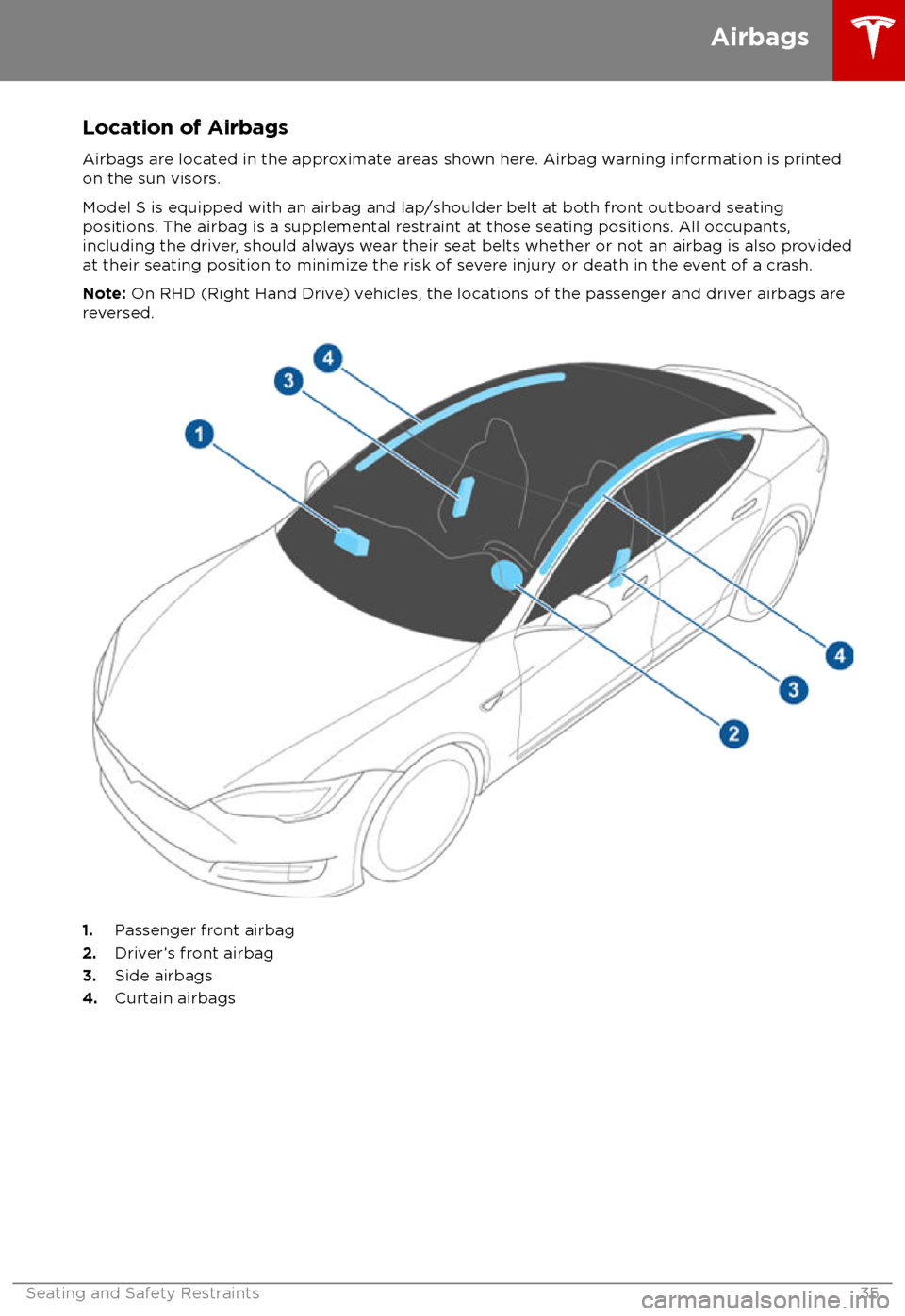
Location of AirbagsAirbags are located in the approximate areas shown here. Airbag warning information is printed
on the sun visors.
Model S is equipped with an airbag and lap/shoulder belt at both front outboard seating
positions. The airbag is a supplemental restraint at those seating positions. All occupants,
including the driver, should always wear their seat belts whether or not an airbag is also provided at their seating position to minimize the risk of severe injury or death in the event of a crash.
Note: On RHD (Right Hand Drive) vehicles, the locations of the passenger and driver airbags are
reversed.
1. Passenger front airbag
2. Driver
Page 37 of 195

How the Airbags Work
Airbags
inflate when sensors detect an impact
that exceeds deployment thresholds. These
thresholds are designed to predict the severity
of a crash in time for the airbags to help
protect the vehicle
Page 38 of 195

Disabling the Passenger Front
Airbags
When a child is seated in the front passenger
seat (even when the child is seated in a child safety seat or booster seat), you must disable
the passenger front airbags to prevent them
from injuring the child if a collision occurs.
Note: Rear seats are the preferred location for
seating children in child safety seats.
To turn
off the front and side airbags on the
passenger side of the vehicle, touch
Controls > Settings > Safety & Security >
Passenger Front Airbag .
The OFF status of the front passenger airbag
displays in the upper right corner of the touchscreen. When the airbag is ON, no status
is displayed on the touchscreen.
If the airbag is on, even if you have turned itoff (or vice versa), contact Tesla immediately.
Note: Model S has a capacitive touchscreen
and may not respond to your touch if you are
wearing standard gloves. If the touchscreen is
not responding, remove gloves or wear gloves
with conductive
fingertips for use with
capacitive touchscreens.
Warning: Never seat a child in a child
safety seat or a booster seat on the front
passenger seat when the airbag is
activated. Doing so can cause serious injury or death.Warning: If the passenger airbag control
does not appear to be functioning, do not
seat a passenger in the front seat.
Contact Tesla immediately to have the
vehicle inspected and if necessary,
repaired.
Inflation Effects
Warning: When airbags inflate, a finepowder is released. This powder can
irritate the skin and should be thoroughly
flushed from the eyes and from any cuts
or abrasions.
After inflation, the airbags deflate to provide a
gradual cushioning effect for the occupants
and to ensure the driver
Page 39 of 195
bags if a collision occurs. It can also
reduce the accuracy of the occupant
detection system, if equipped.Warning: Airbags inflate with
considerable speed and force, which can
cause injury. To limit injuries, ensure that occupants are wearing seat belts and are
correctly seated, with the seat positioned as far back as possible.Warning: Do not use a child safety seat or
seat young children on a seat with an
operational airbag in front of it. Doing so
can cause injury or death if the airbag
inflates.
Warning: To ensure correct inflation of
the side airbags, maintain an
unobstructed gap between an occupant
Page 49 of 195
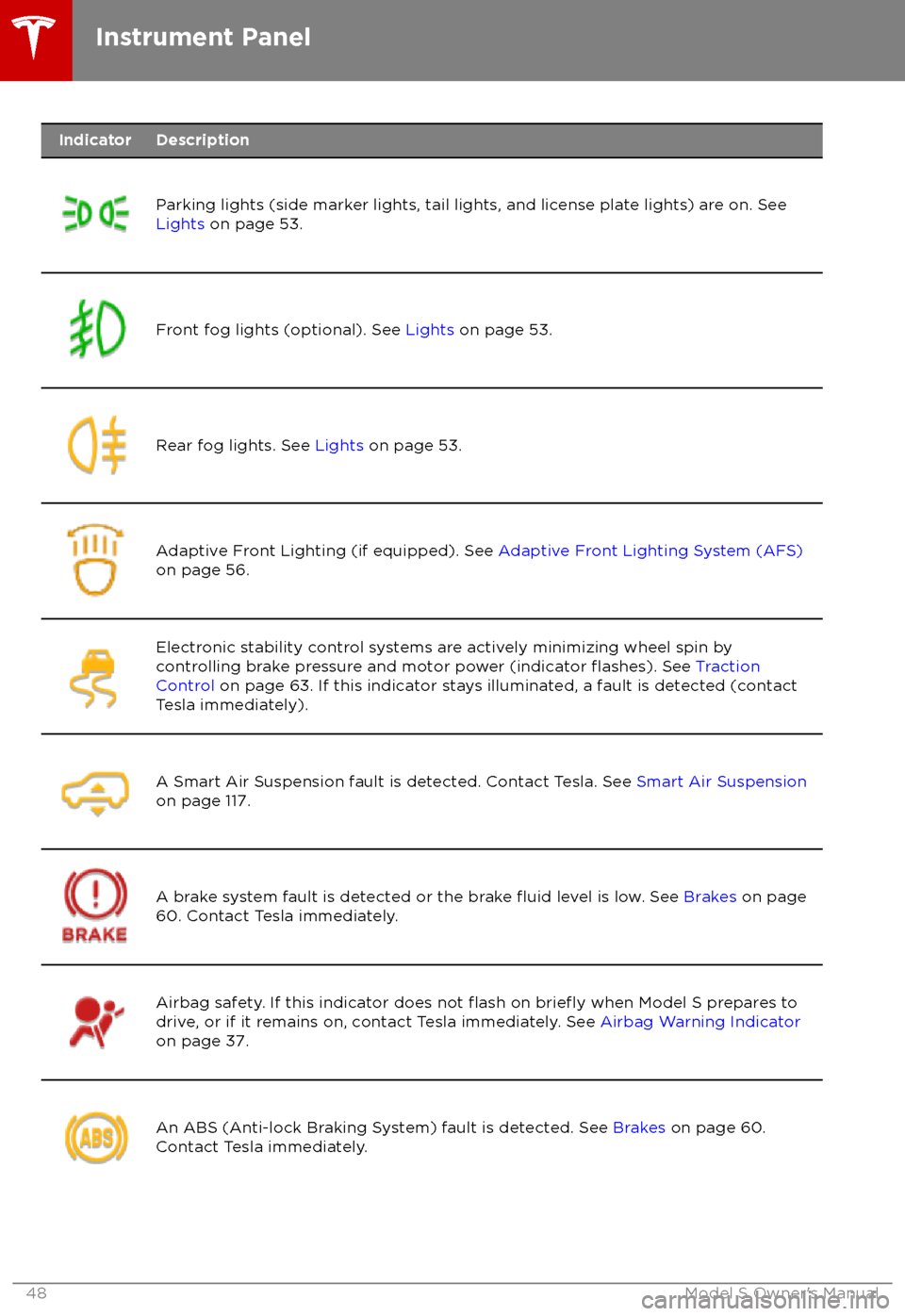
IndicatorDescription
Parking lights (side marker lights, tail lights, and license plate lights) are on. See
Lights on page 53.Front fog lights (optional). See Lights on page 53.Rear fog lights. See Lights on page 53.Adaptive Front Lighting (if equipped). See Adaptive Front Lighting System (AFS)
on page 56.Electronic stability control systems are actively minimizing wheel spin by
controlling brake pressure and motor power (indicator flashes). See Traction
Control on page 63. If this indicator stays illuminated, a fault is detected (contact
Tesla immediately).A Smart Air Suspension fault is detected. Contact Tesla. See Smart Air Suspension
on page 117.A brake system fault is detected or the brake fluid level is low. See Brakes on page
60. Contact Tesla immediately.Airbag safety. If this indicator does not flash on briefly when Model S prepares to
drive, or if it remains on, contact Tesla immediately. See Airbag Warning Indicator
on page 37.An ABS (Anti-lock Braking System) fault is detected. See Brakes on page 60.
Contact Tesla immediately.Instrument Panel
48Model S Owner
Page 156 of 195

Cleaning the Interior
Frequently inspect and clean the interior to maintain its appearance and to prevent
premature wear. If possible, immediately wipe up spills and remove marks. For general
cleaning, wipe interior surfaces using a soft
cloth (such as
microfiber) dampened with a
mixture of warm water and mild non-
detergent cleaner (test all cleaners on a
concealed area before use). To avoid streaks,
dry immediately with a soft lint-free cloth.
Interior Glass
Do not scrape, or use any abrasive cleaning
fluid on glass or mirrored surfaces. This can
damage the reflective surface of the mirror
and the heating elements in the rear window.
Airbags
Do not allow any substance to enter an airbag
cover. This could
affect correct operation.
Dashboard and Plastic Surfaces
Do not polish the upper surfaces of the
dashboard. Polished surfaces are
reflectiveand could interfere with your driving view.
Leather Seats
Leather is prone to dye-transfer which can
cause discoloration, particularly on light colored leather. White and tan leather iscoated with an anti-soiling treatment. Wipespills as soon as possible using a soft cloth
moistened with warm water and non-
detergent soap. Wipe gently in a circular
motion. Then wipe dry using a soft, lint-free
cloth. Using detergents or commercially
available leather cleaners and conditioners is
not recommended because they can discolor or dry out the leather.
Polyurethane Seats
Wipe spills as soon as possible using a soft
cloth moistened with warm water and non-
detergent soap. Wipe gently in a circular
motion. After cleaning, allow the seats to air
dry.
Cloth Seats
Wipe spills as soon as possible using a soft
cloth moistened with warm water and non-
detergent soap. Wipe gently in a circular
motion. Then wipe dry using a soft, lint-free
cloth. Vacuum the seats as needed to remove
any loose dirt.
Carpets
Avoid over-wetting carpets. For heavily soiled
areas, use a diluted upholstery cleaner.
Seat Belts
Extend the belts to wipe. Do not use any type
of detergent or chemical cleaning agent.
Allow the belts to dry naturally while
extended, preferably away from direct
sunlight.
Tesla Built-In Rear Facing Child Seats
Vacuum the seats to remove any loose dirt. Wipe the seats with a soft cloth dampened
with warm water. You can also use an upholstery cleaner designed for automotive
use. Extend the belts to wipe. Allow the belts
to dry naturally, preferably away from direct
sunlight.
Touchscreen and Instrument Panel
Clean the touchscreen and instrument panel
using a soft lint-free cloth
specificallydesigned to clean monitors and displays. Do not use cleaners (such as a glass cleaner) and
do not use a wet wipe or a dry statically- charged cloth (such as a recently washed
microfiber). To wipe the touchscreen without
activating buttons and changing settings, you
can enable clean mode. Touch Controls >
Displays > Clean Mode . The display darkens to
make it easy to see dust and smudges.
Chrome and Metal Surfaces
Polish, abrasive cleaners or hard cloths can
damage the
finish on chrome and metal
surfaces.
Cautions for Interior Cleaning
Caution: Using solvents (including
alcohol), bleach, citrus, naphtha, or silicone-based products or additives on
interior components can cause damage.Caution: Statically-charged materials can
cause damage to the touchscreen or
instrument panel.Warning: If you notice any damage on an
airbag or seat belt, contact Tesla
immediately.Warning: Do not allow any water,
cleaners, or fabric to enter a seat belt
mechanism.Warning: Exposure to chemical cleaners
can be hazardous and can irritate eyes
Cleaning
Maintenance155
Page 189 of 195

AABS (Anti-lock Braking System) 60
absolute speed limit 97
Acceleration (dual-motor) 104
Acceleration settings 67
access panel, removing 159accessoriesplugging into power socket 122
adaptive headlights 56
air circulation 112
air conditioning 111
air distribution 112
air
filter 115
air suspension 118
air vents 115
airbag, front passenger, disabling 37
airbags 35
alarm 132
all-season tires 151
always connected, setting 70
anti-lock braking (ABS) 60
audioplaying files 119
steering wheel buttons 41
volume control 119
Auto High Beam 56
Auto Lane Change 85
auto-raising suspension 117
automatic emergency braking 94
Autopark 87
Autopilot components 73
Autosteer 82
average range 70
B backup camera 72
battery (12V)complete discharge 140specifications 170Battery (high voltage)care of 140
coolant 159
specifications 170
temperature limits 140
battery (key), replacing 5
blind spot warning 91
Bluetoothdevices, playing audio files from 122
general information 124
phone, pairing and using 124
body repairs 163
body touch up 156
brake
fluid replacement 147
brakesautomatic in emergencies 94fluid level 160brakes (continued)overview of 60specifications 170
brightness of displays 107
C
Cabin Overheat Protection setting 107
cabin temperature control 111
Calendar app 131
camera (rear view) 72
cameras (autopilot) 73
car cover 156
car status, displaying 41, 42
car washes 154
cargo area 11
cargo volume 168
carpets, cleaning 155
CE
certifications 185
CHAdeMO 139
chains 151
change of ownership 110
charge port 142
charge port light 143
chargingcharge settings 144
components and equipment 138
instructions 142
public charging stations 139
scheduling 144
status of 145
charging locations, finding 127
child protectiondisabling liftgate and rear door handles 7
disabling rear window switches 9child seatscleaning 155
disabling front passenger airbag 37
installing and using 24
Tesla built-in rear facing 31
Chill acceleration 67
cleaning 154
climate controls 111
Climate Timer 114
Cold Weather controls 104
collision avoidance assist 93
console12V power socket 122
cup holders 17
USB ports 122
consumption chart 70
contact informationroadside assistance 177coolantBattery, checking level of 159
Battery, replacement interval 147
copyrights 182
Creep 104
Index
188Model S Owner